














Framer and Webflow a Better Alternative to WordPress
Introduction
The world of content management systems (CMS) has expanded beyond the traditional WordPress landscape. While WordPress remains a popular choice for website creation, innovative platforms like Framer and Webflow have emerged, offering designers and developers new possibilities for crafting interactive and visually stunning websites. In this article, we delve into the realm of alternative CMS platforms, exploring the capabilities and advantages they bring to the table.
Beyond WordPress: Exploring New Horizons
Traditional CMS platforms like WordPress have long been synonymous with website creation and management. However, the digital landscape is constantly evolving, and designers and developers are seeking more versatile and dynamic solutions to meet the demands of modern web design. Enter Framer and Webflow, two CMS platforms that challenge the status quo and offer a fresh perspective on web development.
Understanding Framer: The Power of Interactive Prototyping and Customization
Framer is not just your average content management system (CMS); it is a robust and comprehensive prototyping tool that opens up a world of possibilities for designers and developers alike. This section explores the unique features and capabilities of Framer, highlighting its strengths and how it stands apart from traditional CMS platforms.
What Sets Framer Apart?
Framer is primarily known for its exceptional prototyping capabilities, allowing designers to create interactive and animated user interfaces that go beyond static designs. Unlike traditional CMS platforms that focus on content management and website structure, Framer empowers designers to bring their creations to life with realistic interactions and transitions, providing clients and stakeholders with a more tangible and immersive experience of the final product.
Interactive Prototyping Made Easy
Framer’s intuitive and user-friendly interface makes interactive prototyping accessible to designers of all levels. From simple micro-interactions to complex animations, Framer provides a wide range of tools and features to cater to various design requirements. Designers can easily create click-through prototypes, simulate scrolling, and add dynamic animations, allowing them to showcase their design concepts with impressive interactivity.
Customization and Design Freedom
One of the standout features of Framer is the level of customization it offers. Designers have the freedom to tweak every aspect of their designs, ensuring that each element aligns with their creative vision. From adjusting the easing of animation to refining the responsiveness of interactive elements, Framer provides fine-grained control over design details.
Seamless Integration with Code
Framer’s seamless integration with code sets it apart from many other prototyping tools. The platform generates production-ready code from design files, bridging the gap between design and development. This feature streamlines the handoff process, allowing designers to collaborate more effectively with developers, ensuring accurate and efficient implementation of designs.
Collaboration and Teamwork
Framer is designed to facilitate collaboration among designers and developers. With its real-time collaboration feature, multiple team members can work simultaneously on a project, making it easier to share ideas, provide feedback, and iterate on designs. This collaborative approach promotes cross-functional teamwork and accelerates the design and development workflow.
Limitations and Learning Curve
While Framer offers an array of powerful features, it does come with a learning curve, especially for designers who are new to prototyping and animation. Designers with a background in coding and interaction design may find it easier to adapt to Framer’s capabilities. However, once designers become familiar with the platform, they can unlock its full potential and elevate their design projects to new heights.
Use Cases for Framer
Framer’s versatility makes it suitable for a variety of use cases. Designers often leverage Framer for:
- App Prototyping: Framer is an excellent choice for prototyping mobile and web applications, allowing designers to simulate app interactions and user flows with ease.
- User Testing: Interactive prototypes created with Framer are invaluable for conducting user testing sessions. Designers can gather feedback and insights from users to refine their designs.
- Micro-interactions: Framer is ideal for designing micro-interactions, such as button animations, hover effects, and loading spinners, which add delightful details to user interfaces.
- Animations and Transitions: Framer’s powerful animation capabilities enable designers to create smooth and engaging transitions, enhancing the overall user experience.
Check out: Gamified Assessments: Assessing Knowledge and Skills with Fun and Games
Exploring Webflow: A Visual CMS and Web Design Platform
Webflow is a revolutionary web design platform that has gained immense popularity among designers and developers alike. It stands out as a visual CMS that allows users to create visually stunning and interactive websites without the need for manual coding. With its intuitive drag-and-drop interface and powerful features, Webflow has become a go-to solution for designers looking to build unique and user-centric websites.
The Power of No-Code Development and Customization
One of the most significant advantages of Webflow is its no-code approach to web design and development. Traditionally, creating a custom website required deep knowledge of HTML, CSS, and JavaScript. However, Webflow eliminates this barrier by providing designers with an intuitive visual interface to design and customize websites. Designers can easily drag and drop elements onto the canvas, visually design layouts, and customize every aspect of the website without writing a single line of code.
The no-code approach empowers a wider range of designers, including those who may not have extensive coding knowledge, to take control of the web design process. This democratization of web design opens up new possibilities for creativity and innovation, as designers can freely experiment with different layouts, animations, and interactions without the limitations of code.
Seamless Hosting and Content Management
Webflow not only offers an exceptional web design experience but also streamlines the process of hosting and content management. Once the website design is complete, users can easily publish it on the Webflow platform with just a few clicks. Webflow provides reliable and secure hosting, ensuring that the website is accessible to visitors from anywhere in the world.
Moreover, Webflow’s built-in content management system (CMS) simplifies the process of managing and updating website content. With the CMS, designers can create and edit content directly within the platform, without the need for third-party plugins or additional software. This seamless integration of design, hosting, and content management saves time and effort, allowing designers to focus on creating exceptional user experiences.
Integrations and E-Commerce Capabilities
Webflow recognizes the importance of seamless integrations with other tools and services to enhance the overall web design workflow. It offers integrations with popular tools like Google Analytics, Mailchimp, and Zapier, among others. These integrations provide designers with additional features and functionalities to optimize their websites and improve user engagement.
Furthermore, Webflow supports e-commerce capabilities, making it an ideal platform for designers and businesses looking to create and manage online stores. With Webflow’s e-commerce features, designers can design stunning product pages, set up payment gateways, and manage inventory and orders efficiently.
Limitations and Scalability
While Webflow excels in its no-code approach and visual design capabilities, it may face scalability challenges for larger and more complex projects. While it is an excellent choice for small to medium-sized websites, some enterprise-level projects may require more extensive custom development and coding.
Additionally, for designers who prefer working entirely within the code, Webflow’s visual interface may feel restrictive. While the platform generates clean and semantic HTML and CSS code, designers who are well-versed in coding may prefer more direct control over the codebase.
Community and Support
Webflow boasts an active and vibrant community of designers, developers, and enthusiasts who share their knowledge and experiences. This community-driven approach fosters a supportive environment where designers can learn from each other and discover new ways to enhance their web design skills.
Webflow also provides extensive documentation, tutorials, and support resources to help users make the most of the platform. Whether designers are just starting or are experienced professionals, Webflow’s resources are valuable assets for mastering the platform and creating exceptional websites.
Framer vs. Webflow: A Comparative Analysis
When it comes to choosing a content management system (CMS) or web design platform, designers often find themselves debating between Framer and Webflow. Both platforms offer unique features and capabilities that cater to different design needs. In this comparative analysis, we delve into the strengths and weaknesses of Framer and Webflow to help designers make an informed decision based on their project requirements and skillsets.
Workflow and Use Cases
Framer and Webflow cater to distinct design workflows and use cases. Framer is renowned for its interactive prototyping capabilities and its ability to create realistic user interfaces with animations and transitions. Designers who want to showcase their design concepts with interactive elements and micro-interactions may find Framer an ideal choice. Its prototyping-oriented approach makes it a preferred tool for projects that require a high level of user interaction.
On the other hand, Webflow is primarily a visual CMS and web design platform that empowers designers to build visually stunning websites without writing a single line of code. With its intuitive drag-and-drop interface, Webflow allows designers to see their designs come to life in real-time, making it an excellent choice for designers who want to focus on the visual aspect of web design. Webflow is versatile and suitable for a wide range of design projects, from portfolio websites to small business sites and even e-commerce platforms.
Learning Curve and Skill Requirements
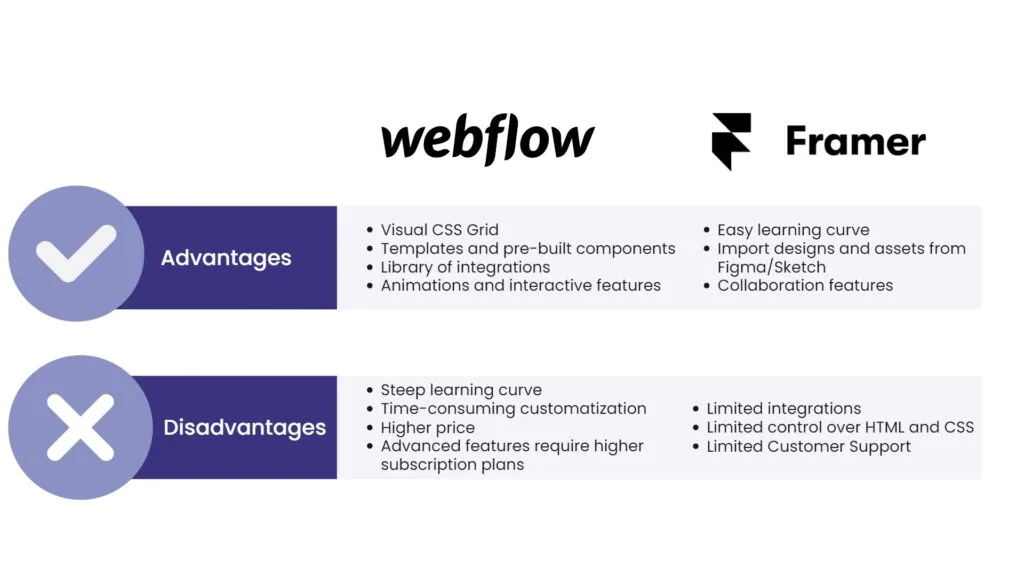
Another crucial aspect of the comparative analysis is the learning curve and skill requirements for using Framer and Webflow. Framer, with its robust prototyping capabilities, may have a steeper learning curve for designers who are new to prototyping and animation concepts. Designers with a background in coding and interaction design may find it more accessible. However, the learning curve may slow down the design process, particularly for those unfamiliar with prototyping workflows.
Webflow, on the other hand, is designed with a no-code approach, making it an excellent choice for designers with varying levels of expertise, including beginners with no coding experience. Its user-friendly interface allows designers to start designing right away without worrying about writing code. The no-code approach streamlines the design process and enables designers to focus on creativity and visual aesthetics.
Development and Collaboration
In terms of development and collaboration, both Framer and Webflow have their strengths and weaknesses. Framer’s integration with code allows for seamless collaboration between designers and developers. Designers can hand off their designs to developers, who can then implement them accurately using the generated production-ready code. This integration streamlines the development process and ensures a smooth transition from design to development.
However, Framer’s reliance on code may present challenges for developers who are new to the platform. The learning curve for developers may slow down the development process initially, but once they become familiar with Framer’s capabilities, collaboration between designers and developers becomes more efficient.
Webflow’s no-code approach simplifies the handoff process between designers and developers. Since designers can create fully functional websites without manual coding, developers can focus on implementing the design without worrying about interpreting complex code. This seamless collaboration between designers and developers accelerates the development process and reduces errors in implementation.
Limitations and Considerations
While both Framer and Webflow offer significant advantages, they also come with certain limitations and considerations that designers should be aware of.
Framer’s powerful prototyping capabilities may require designers to invest time in learning the platform. For designers who are new to prototyping and animation concepts, the learning curve may be steep initially. Additionally, Framer’s primary focus on prototyping may limit its use for certain projects that do not require extensive user interactions.
Webflow, while user-friendly and versatile, may face scalability challenges for larger enterprises or complex web applications. For such projects, other CMS platforms or custom development may be more suitable.
Check out: The Kamikaze Pilots: Sacrifice, Honor, and the Complexities of Pain
Choosing the Right Platform
Ultimately, the decision between Framer and Webflow depends on the specific project requirements and the designer’s skillset. For projects that demand interactive prototypes and advanced user interactions, Framer is an excellent choice. Designers with a coding background and a focus on prototyping will find Framer to be a powerful tool in their arsenal.
On the other hand, for designers who prefer a visual and no-code approach to web design, Webflow offers an intuitive platform with robust capabilities. Its versatility makes it suitable for a wide range of design projects, making it an attractive option for designers of all skill levels.
In conclusion, both Framer and Webflow have their unique strengths, and each excels in its respective domain. By carefully considering project requirements, skillsets, and desired design outcomes, designers can make informed decisions and leverage the power of these innovative CMS and web design platforms to create stunning and user-centric websites.
Benefits of Exploring Alternative CMS Platforms
Enhanced Design Capabilities
Both Framer and Webflow offer enhanced design capabilities that go beyond traditional CMS platforms. Designers can create interactive and visually captivating websites that captivate users and drive engagement.
Streamlined Design and Development Workflow
By bridging the gap between design and development, Framer and Webflow facilitate a more efficient workflow. The seamless integration of design and code accelerates the development process and reduces errors in implementation.
Expanded Creative Freedom
Designers can explore new horizons and experiment with cutting-edge design techniques, animations, and interactions. Alternative CMS platforms empower designers to push boundaries and create groundbreaking web experiences.
Diverse Use Cases
Framer and Webflow cater to diverse use cases, from interactive prototypes to fully functional websites. Whether designers are working on product design, marketing campaigns, or e-commerce platforms, these CMS platforms offer flexible solutions.
Conclusion
Beyond WordPress, alternative CMS platforms like Framer and Webflow offer designers and developers exciting opportunities to elevate their web design projects. From interactive prototypes to visually stunning websites, these platforms empower creatives to push the boundaries of web design. As the digital landscape continues to evolve, exploring these innovative CMS platforms is essential for staying at the forefront of the web design industry.




Trackbacks/Pingbacks